Your reply rate halved last week and nothing about the campaign changed. Same list, same copy, same sender. That pattern is almost never a writing problem. It is a signal that mailbox providers have changed their mind about your domain, and no subject line rewrite will fix it. Diagnosing that is where our email automation work usually starts.
Email deliverability is the least glamorous part of outbound and the part that decides whether the rest of it matters. A perfectly targeted message to a perfectly qualified prospect is worth nothing in a spam folder.
The uncomfortable part is that most advice on this subject is about the wrong layer. It tells you to avoid the word “free” and to shorten your subject line, while the actual problem is a domain with no DKIM record sending four hundred messages a day from a shared IP address.
What is email deliverability?
Email deliverability is the percentage of outbound emails that successfully land in a recipient’s primary inbox rather than being blocked, filtered into spam, or routed to a promotions tab.
It is not the same as delivery. Delivery means the receiving server accepted the message. Deliverability means a human might actually see it. A campaign can report 98% delivered and still be invisible, because accepted and placed in the inbox are two different outcomes, and most sending tools only report the first one.
That gap is the single most common reason a team believes their email is working when it is not.
Why do my emails go to spam?
Emails go to spam for three reasons, in this order of importance: your domain is not authenticated, your sending reputation is poor, or recipients are not engaging with what you send.
Content is a distant fourth. Spam filters moved past keyword matching more than a decade ago. A message with no authentication records from a domain registered three weeks ago will be filtered no matter how carefully it is written, and a message from a trusted domain with high engagement will reach the inbox even if it contains the word “discount”.
This matters because it tells you where to spend your time. Rewriting copy is cheap and visible, so that is what most teams do. Fixing DNS records is invisible and nobody enjoys it, so it gets skipped, and it is the thing that would have worked.
How Gmail and Outlook decide where your email lands
Mailbox providers run three checks before a message reaches an inbox decision point.
Authentication. Can they prove the message came from who it claims to come from? This is SPF, DKIM and DMARC, and it is pass or fail.
Reputation. What has this domain and this IP address done historically? Complaint rates, bounce rates, spam trap hits and sending patterns all feed a score that you cannot see directly but can observe the effects of.
Engagement. Do recipients open, reply, and move messages out of spam, or do they delete without reading and click report spam? Replies are the strongest positive signal available in B2B, which is one reason outbound that generates conversations stays deliverable and outbound that generates nothing decays.
Authentication is binary and you can fix it this afternoon. Reputation and engagement are earned over weeks and lost in days.
SPF, DKIM and DMARC explained
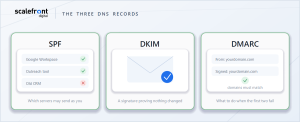
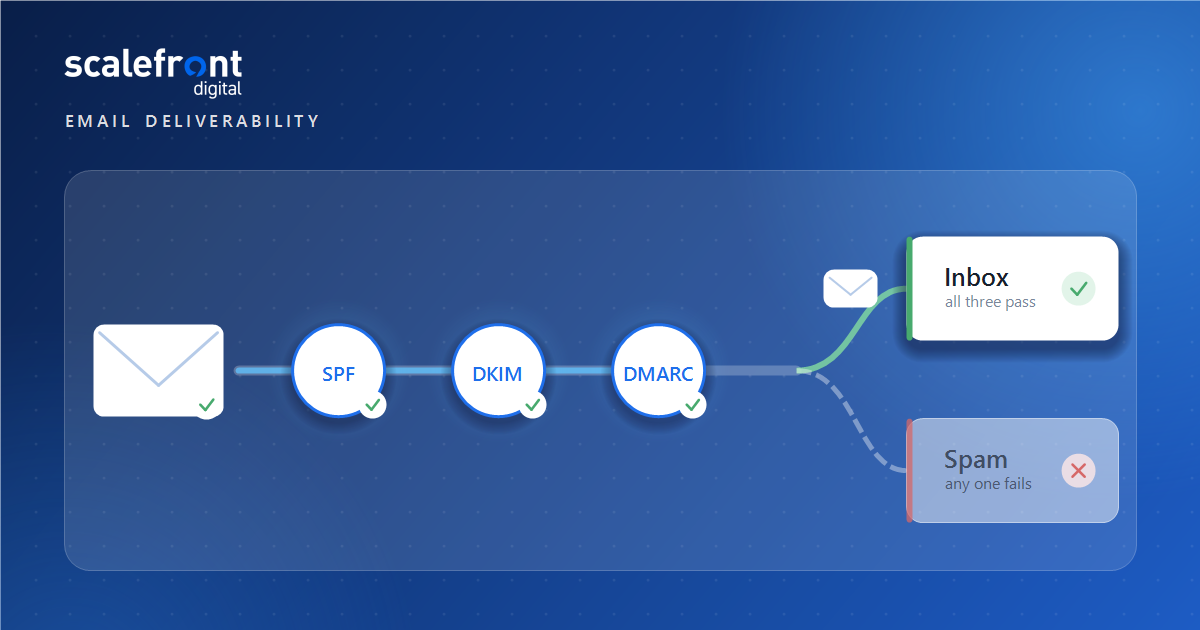
These are three DNS records that together prove your email is legitimate. You need all three.
SPF (Sender Policy Framework) lists which servers are allowed to send email on behalf of your domain. If you send through Google Workspace, an outreach tool and a CRM, all three need to appear in your SPF record. A sender not listed in the record is more likely to be marked as spam.
DKIM (DomainKeys Identified Mail) adds a cryptographic signature to each message so the receiving server can verify the domain owner actually sent it and that nothing was altered in transit. Google requires a DKIM key of at least 1024 bits for messages to personal Gmail accounts and recommends 2048 bits where your provider supports it.
DMARC (Domain-based Message Authentication, Reporting, and Conformance) tells receiving servers what to do with messages that fail the first two checks. It also enforces alignment, which is the part teams miss: the authenticating domain has to match the domain in the From header. You can pass SPF and still fail DMARC if those two domains differ, which is exactly what happens when a tool sends on your behalf from its own infrastructure.
Set all three up at your domain provider before you send anything. Messages that fail these checks may be rejected outright with a 5.7.26 error, which is a refusal, not a filter.
What Google and Yahoo require from senders
Since 2024, Google enforces a published set of requirements for email sent to personal Gmail accounts, and Yahoo introduced an equivalent set at the same time. These are not best practices. They are conditions of delivery.
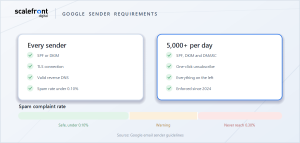
According to Google’s email sender guidelines, every sender must:
- Authenticate with SPF or DKIM
- Use a TLS connection to transmit email
- Publish valid reverse DNS records, where the sending IP matches the hostname in the PTR record
- Keep spam rates reported in Postmaster Tools below 0.10%, and never reach 0.30% or higher
Senders of 5,000 or more messages per day to personal Gmail accounts must additionally:
- Authenticate with SPF, DKIM and DMARC
- Support one-click unsubscribe on marketing and subscribed messages, using the List-Unsubscribe-Post and List-Unsubscribe headers
Two things are worth drawing out. The spam rate ceiling is far lower than most people assume. One complaint in a thousand is the recommended limit, and three in a thousand is the point Google tells you never to reach. On a list of five thousand, fifteen people hitting report spam is enough to put you in trouble.
And the 5,000 per day threshold is counted across your domain, not per campaign. Teams running several sequences at once routinely cross it without realizing they have.
Why your sending domain matters more than your copy
Send cold outreach from a separate domain, never from the domain your company website and client email run on.
If a cold campaign damages the reputation of your primary domain, you do not just lose outbound. You lose invoices reaching clients, contracts reaching signatories, and password resets reaching your own team. That is a business continuity problem created by a marketing decision.
The standard approach is to register one or more lookalike domains, for example the .co or .net version of your main domain, or a hyphenated variant, and route all outbound through those. Each gets its own authentication records. If one burns, you retire it and the business carries on.
Keep the volume per domain and per mailbox low. The failure mode is not sending too much in total, it is sending too much from one place.
How to warm a new domain
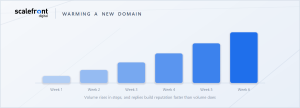
A new domain has no reputation, and no reputation is treated with suspicion rather than neutrality. Warming is the process of building a sending history before you send anything that matters.
Register the domain and leave it for a few weeks before sending. Age alone is a signal.
Set up authentication first, not after the first campaign. Starting unauthenticated and fixing it later means your first impression is the bad one.
Start at a handful of messages per mailbox per day and increase gradually over several weeks. Most outreach platforms will do this automatically, and the exact ramp matters less than the fact that there is one.
Prioritize replies during the warming period. Sending to contacts likely to respond builds reputation faster than volume does, which is the opposite of how most teams use a new domain.
Do not treat warming as a one-off. A domain that goes quiet for a month and then resumes at full volume looks like a compromised account.
List hygiene and bounce rates
Bounce rate is a reputation signal, and a list that has not been verified will produce bounces that cost you more than the contacts were worth.
Hard bounces mean the address does not exist. A high rate of them tells mailbox providers you are sending to a list you did not validate, which is what spammers do. Verify every list before the first send, and re-verify anything older than about three months, because B2B contact data decays continuously as people change jobs.
Spam traps are the more serious risk. These are addresses that exist only to catch senders using purchased or scraped lists. Hitting one can damage a domain quickly, and you will get no warning that it happened. The only protection is controlling where your data comes from, which is why lead list building and enrichment is a deliverability decision as much as a targeting one.
Suppress aggressively. Anyone who unsubscribed, bounced, replied negatively or has not engaged across several campaigns should come out. A smaller list that engages outperforms a larger one that does not, on reply rate and on reputation at the same time.
What spam complaint rate is safe
Keep complaints below 0.10% of messages delivered, and treat 0.30% as a line you never approach.
Those are Google’s published numbers, and they are stricter than most teams expect. The practical consequence is that you cannot afford to send to people who did not want to hear from you, because the margin for error is one person in a thousand.
Three things reduce complaints more than anything else. Target accurately, so the message is at least relevant. Make the unsubscribe obvious, because a visible opt out absorbs the irritation that would otherwise become a spam report. And stop sequences the moment someone asks you to, which requires your outreach tool and your CRM to actually share that information rather than each holding half of it.
That last point is where CRM and pipeline automation earns its place in a deliverability conversation. A reply that never reaches the sequence is a complaint waiting to happen.
What in the message itself hurts deliverability
Content matters less than infrastructure, but it is not irrelevant. Four things carry real weight.
Links. A cold email with several links, or a link to a domain with poor reputation, is treated with more suspicion than a plain message. One link is usually enough. Link shorteners are a liability, because they are shared with whoever else used that shortener.
Images and attachments. Heavy HTML, tracking pixels and attachments all raise risk. Plain text performs better in cold outreach, and it also looks more like a message a person actually typed.
Formatting that mimics marketing. Multiple fonts, colored buttons and a footer full of social icons signal bulk mail. A one to one message should look like one.
Volume of identical copy. Thousands of byte-identical messages are easy to cluster and filter. Genuine variation between messages helps, and it tends to improve reply rates anyway.
Spam word lists, by contrast, are mostly folklore. Writing “free consultation” will not send you to spam. Sending from an unauthenticated domain will.
How to diagnose a sudden drop in replies
Work from infrastructure outward, because that is the order of likelihood.
Check authentication first. Confirm SPF, DKIM and DMARC still pass, since a provider change, a new sending tool or an edited DNS record can break alignment silently.
Check whether you are being blocked rather than filtered. Bounce messages carry diagnostic codes, and a 5.7.26 tells you authentication failed, which is a different problem from poor reputation.
Check Postmaster Tools for your domain and IP reputation, and for the spam rate trend over the previous weeks. A reputation drop usually precedes the reply drop by several days.
Check what changed in your own sending. A volume increase, a new mailbox added to rotation, a bought list, a changed sending schedule. Something almost always did.
Check placement directly with a seed test, which is the only way to tell inbox from promotions from spam, because your sending tool cannot see where the message landed.
How to measure email deliverability
Track four things, because open rate alone will mislead you.
Postmaster Tools gives you domain reputation, IP reputation, spam rate and authentication success for Gmail traffic. It is free, it is the only direct view of how Google sees you, and most teams have never set it up.
Seed and placement testing sends to a controlled set of addresses across providers to tell you where messages actually land. This is the number people assume their email platform reports and it does not.
Bounce rate by type, separating hard from soft, tells you whether the problem is data quality or sending behavior.
Reply rate, segmented by domain and mailbox, surfaces a single burned sender before it drags the rest down with it.
Open rate deserves a warning. Apple Mail Privacy Protection and similar features preload images, which inflates opens and makes the metric unreliable as a deliverability signal. Replies are harder to fake and worth more.
Common email deliverability mistakes
- Sending cold outreach from the primary company domain
- Publishing SPF but never DKIM, or either without DMARC
- Launching a new domain at full volume with no warming period
- Buying a list and sending to it unverified
- Running several sequences at once and crossing 5,000 messages a day unknowingly
- Hiding the unsubscribe link, which converts opt outs into spam complaints
- Treating a reply as a marketing event rather than a signal to stop the sequence
- Measuring open rate and concluding deliverability is fine
- Never setting up Postmaster Tools, so the first evidence of a problem is silence
How long does it take to recover deliverability?
Authentication problems resolve as soon as DNS propagates, usually within a day. Reputation damage takes considerably longer, typically several weeks of clean sending at reduced volume.
The recovery sequence is consistent. Fix authentication immediately. Cut volume sharply. Remove every unengaged and unverified contact. Send only to people likely to reply, and keep doing that until reputation metrics in Postmaster Tools recover before scaling back up.
A domain that has been heavily flagged may not be worth recovering. Retiring it and starting again on a fresh domain, properly warmed, is often faster than rehabilitating one that mailbox providers have already learned to distrust.
Frequently asked questions
What is email deliverability?
Email deliverability describes whether a message lands somewhere a person will see it, or gets blocked, filtered into spam, or pushed into a promotions tab. Delivery is a lower bar, confirming only that a server took the message. That is why a campaign can report healthy delivery while most of it sits unseen.
Why are my emails going to spam?
Usually because your domain is not fully authenticated with SPF, DKIM and DMARC, because your sending reputation has been damaged by bounces or complaints, or because recipients are not engaging. Message wording is a smaller factor than most advice suggests.
Do I need SPF, DKIM and DMARC?
Google asks every sender for at least SPF or DKIM, and requires all three once a domain passes 5,000 daily messages to personal Gmail addresses. Configure the full set regardless of volume, since DMARC alignment catches the failures the other two records let through.
What is a good spam complaint rate?
Below 0.10% of delivered messages. Google advises keeping spam rates in Postmaster Tools under that figure and never reaching 0.30% or higher, which means roughly one complaint per thousand messages is the working ceiling.
Should I send cold email from my main domain?
No. Use a separate lookalike domain for outbound so that reputation damage cannot affect invoices, contracts and client correspondence sent from your primary domain. Each sending domain needs its own authentication records.
How long should I warm a new domain?
Several weeks. Begin with only a few sends from each mailbox daily, then raise the ceiling in steps. Targeting contacts who are likely to respond builds reputation faster than scaling volume, because a reply counts for more than a send.
Does email deliverability affect marketing email and cold email differently?
The underlying mechanics are identical, but cold email carries more risk because recipients did not opt in, so complaint rates run higher and list quality varies more. The requirements, thresholds and authentication rules are the same for both.
Can I check where my emails are landing?
Yes, the seed test sends to monitored addresses across providers and reports inbox, promotions or spam placement. Your sending platform cannot see this, which is why its delivery statistics look healthy while reply rates fall.